PD 26-03: Proof of Telephonically Signed Forms for the Department of Child Support Services (DCSS)
| Date: | 03/27/26 |
| To: | CalWORKs and Medi-Cal Benefits Specialists |
| From: | Vivien Phan, SSA BPIS |
| Reference: | N/A |
Background
When Child Support Officers (CSOs) at DCSS process Service Requests (SRs) for child/medical support referrals, the following forms need to be signed and completed:
- Notice and Agreement for Child, Spousal and Medical Support (CW 2.1 N&A)
- Support Questionnaire (CW 2.1Q).
If the CW 2.1 N&A and CW 2.1Q were telephonically signed, when the CSOs go to the CalSAWS Distributed Documents page:
- A preview of the forms shows that the signature portion is blank. This is insufficient proof of a valid signature for DCSS.
-
Note: To avoid unnecessary steps, the Social Services Benefits Specialist (SSBS) must not upload telephonically signed forms into CalSAWS Imaging or email a copy to the CSOs, as the signature portion is still blank. The SSBS must also not manually add "Telephonic Signature" and the date signed to the forms.
-
- The CSOs do not have access to the "View eSign" button, so they cannot confirm that the CW 2.1 N&A and CW 2.1Q were telephonically signed.
The CalSAWS Application Triage and Support (CATS) team does not control DCSS's access to CalSAWS, so DCSS has contacted the State about access to the "View eSign" button.
In the meantime, this PD is issued to streamline how SSBSs provide proof of telephonically signed forms to CSOs.
Guidance
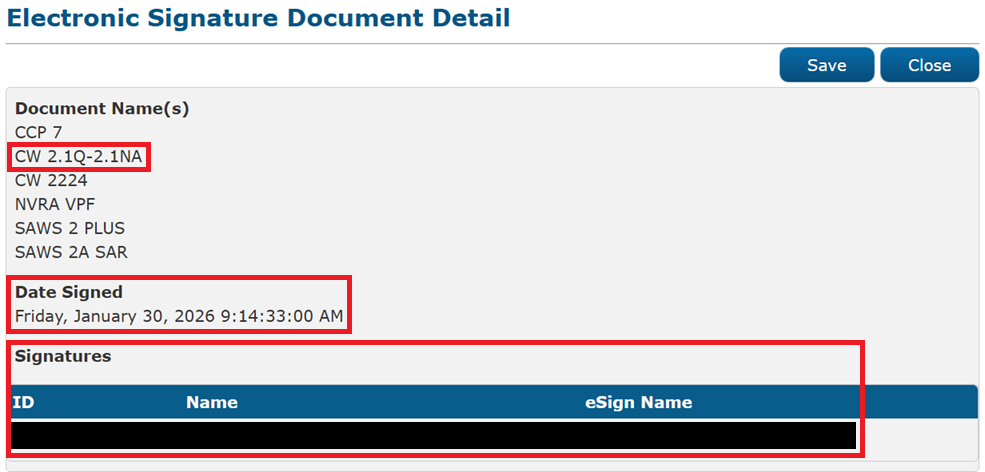
Until CSOs have access to the "View eSign" button, when a CSO requests proof of telephonically signed forms, the SSBS must send a screenshot of the Electronic Signature Document Detail page showing:
- Document name(s),
- Date signed, and
- Signature(s).
Important: If the forms have already been telephonically signed, the SSBS must not request the client to sign these forms again using another method, such as DocuSign or a wet signature. This ensures compliance with not requiring duplicate signatures from clients.
Reminders
Referral Process
Intake SSBSs must request a Child/Medical Support packet, which includes the CW 2.1 N&A and CW 2.1Q, every time a client applies or reapplies for CalWORKs and/or Medi-Cal, and there is an absent parent or alleged parent.
The CalSAWS Absent Parents page must be updated with the information provided on the forms.
Note: If there is an existing record in CalSAWS for the same absent parent, end-date the current entries under the Certification and Agreement section of the Support Questionnaire page. Then add new entries under the Certification and Agreement section. This ensures a referral is sent to DCSS.
Refer to the Referral Process topic of Common Place Handbook Chapter 13: Child/Medical Support for more information, including instructions at re-evaluations (REs).
Complete CW 2.1 N&A and CW 2.1Q
Refer to the Required Forms topic of Common Place Handbook Chapter 13: Child/Medical Support for a list of information that needs to be provided on the CW 2.1 N&A and CW 2.1Q, for these forms to be considered complete, including, but not limited to:
- Name of the absent parent
- Relationship and marital status of the absent parent
- Name, SSN, birth date, and birthplace of the absent parent's children.
Correct Telephonic Signature (TS)
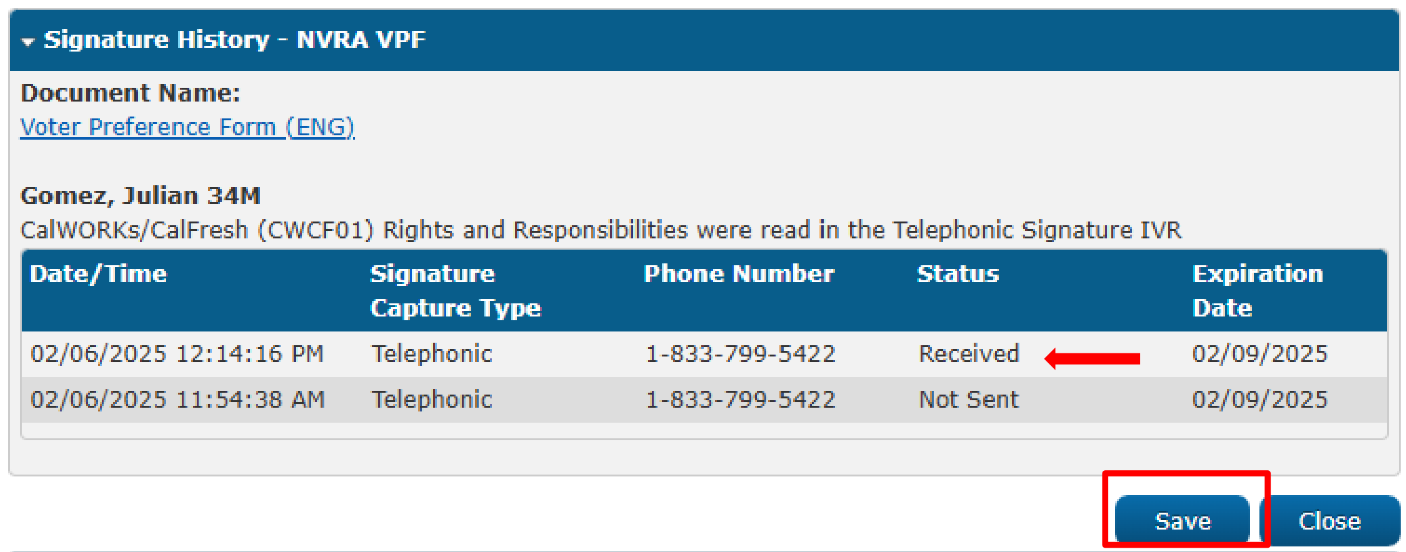
For a correct TS to be on file, the Signature History status must be "Received," and the SSBS must click the "Save" button on the Electronic Signature Document Detail page.
Refer to the following Chewable Bytes for complete guidance on how to process TS forms:
- Chewable Byte 2023-43(a): How to Process Telephonic Signature Forms for Non-Contact Center (Option A), or
- Chewable Byte 2023-43(b): How to Process Telephonic Signature Forms for Non-Contact Center (Option B).
Implementation
This Program Directive is effective immediately.